


Baby Panda World-Learning Game
BabyBus
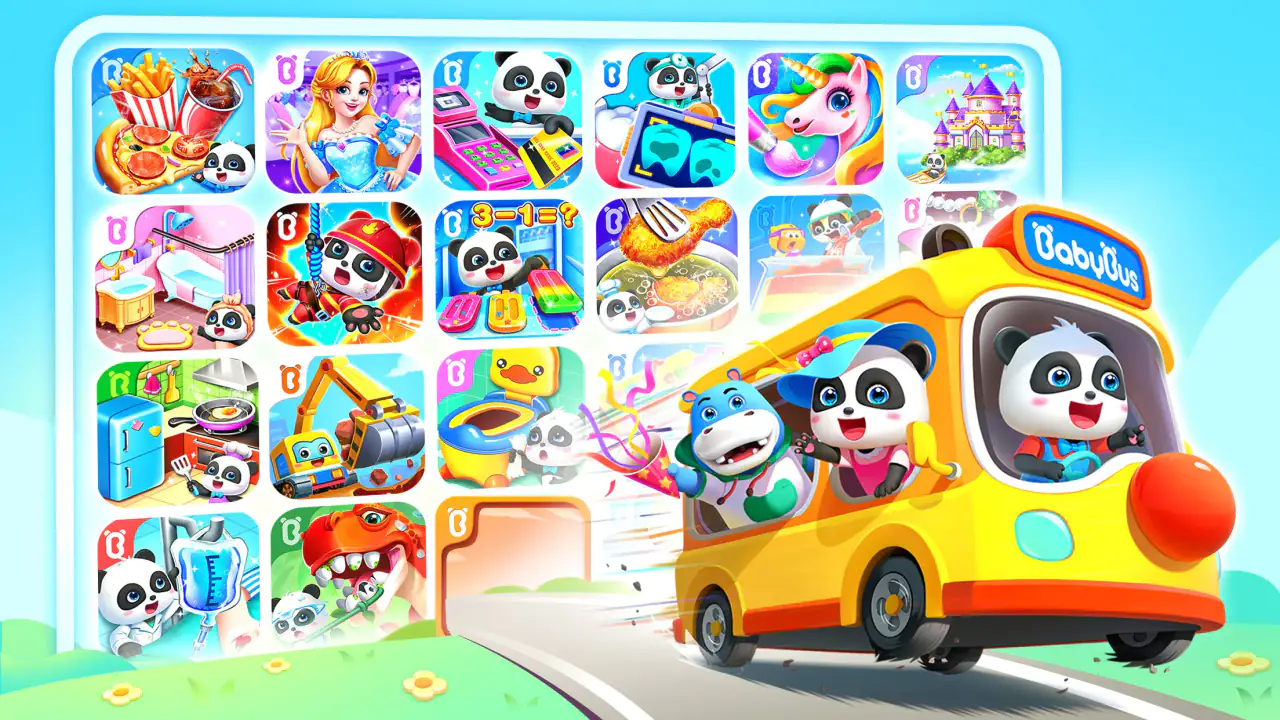
What makes Baby Panda World-Learning Game interesting is not any single puzzle or song, but the way it gathers several child-friendly activities into one place. I found it most useful as a flexible play space for young children who quickly lose interest in repeating one type of exercise. Instead of opening one app for songs, another for simple games, and another for short animations, a child can move between these formats inside the BabyBus experience.
That variety is also the main point I would discuss with a parent before recommending it. This is an educational game for Everyone, developed by BabyBus, and it is free to install. It is not a focused course with a carefully staged lesson plan. It works better as a collection of short, approachable activities that can support everyday learning through repetition, listening, recognition, and simple interaction.
I tested it with that distinction in mind. The important question is not whether it can replace preschool teaching or a structured learning program. It cannot. The better question is whether it gives a child a pleasant way to practise basic ideas while a parent has a few minutes to prepare dinner, travel, or settle down before bedtime. In that role, it has a convincing place.
Related News
Fishdom: Unleashing Creativity in Underwater Puzzles

How My Talking Tom Redefines Mobile Companionship

Solar Smash: Unleashing Cosmic Power in Mobile Culture
One app built around variety rather than a single lesson path
The capability that shapes the whole experience
The central capability is the combination of games, animations, and kids’ songs within one children’s app. That sounds simple, but it changes how the child uses it. A child who is not in the mood for a matching activity can watch an animation or listen to a song, while another child may prefer tapping through a game. The app therefore feels less like a workbook and more like a small digital playroom.
In my experience, this matters because young children often have short, uneven attention spans. They may understand an activity but stop engaging with it after a few minutes. The mix of formats gives parents a way to redirect attention without immediately leaving the app. That does not automatically make every activity educationally deep, but it does make continued participation more realistic.
Related News

Why WhatsApp Messenger Still Makes Everyday Communication Feel Easy

Jurassic World: The Game Is the Better Dino Tycoon for Strategic Players

Threads in Real Life: Who Should Join, Lurk, or Leave

How SHEIN Turned Shopping Into an Endless Content Feed

How to Make Fortnite Feel Smarter on Mobile

Should You Switch to Microsoft Outlook on Mobile?
The store summary presents it as an all-in-one BabyBus collection, and that description matches the broad experience without telling the whole story. The practical benefit is convenience: the adult does not need to decide in advance which narrow skill the child will practise. The trade-off is that the child may move around freely instead of following a clear progression from easier concepts to harder ones.
I would describe the learning style as informal and activity-led. Children encounter ideas through sound, images, repetition, and direct responses rather than through long explanations. That makes it approachable for early learners who are not ready to read instructions independently. It also means older children looking for serious academic challenge will probably find the content too light.
How the different formats affect attention
Games are the part most likely to encourage active participation. They give the child something to do rather than simply something to watch. That distinction is valuable: tapping, choosing, and responding can make a child pay closer attention to what appears on screen. Still, I would not assume that every successful tap represents real understanding. Children can sometimes learn the rhythm of an activity without being able to explain the idea afterward.
Gallery
Animations are more passive, but they can be useful when a child is tired or needs a gentler transition. I see them as a way to keep the experience calm rather than as the strongest learning tool in the app. Songs have a similar role, especially for children who remember information better when it is repeated with rhythm. Parents should treat these elements as prompts for interaction, not as a substitute for talking with the child.
A useful habit is to follow screen time with one small question. After a song, I might ask the child to point out something mentioned in it. After an activity, I might ask what choice they made and why. This turns a short session into a shared conversation and helps reveal whether the child was engaged with the idea or merely enjoying the animation.
What the age rating tells parents in practical terms
The Everyone content rating makes the app suitable for a broad family audience, but I would still expect an adult to guide the first few sessions. Age ratings do not tell you whether the pace, sounds, or amount of choice will suit an individual child. Some children may find the variety exciting; others may jump between activities without settling into any one of them.
For a preschool child, the best approach is usually to start together. Show how to move between the available content, then watch what the child chooses naturally. This quickly reveals whether the child prefers interactive games, music, or visual stories. Once the routine is familiar, the child may be able to explore more independently, but I would keep occasional supervision because independent tapping is not the same as independent learning.
There is also a difference between using the app as a reward and using it as a learning routine. If every session is offered only after a difficult task, the child may see the activities as entertainment disconnected from learning. A short, predictable routine works better: choose one active game, follow it with a song or animation, and then talk briefly about what appeared on screen.
How it works in an ordinary family moment
Imagine a parent preparing lunch while a four-year-old wants attention immediately. I would open the app, choose a short interactive activity, and sit with the child long enough to explain the first response. Once the child understands the basic interaction, the parent can finish the immediate task while remaining nearby. When the activity ends, the parent can ask the child to describe what happened instead of starting another session automatically.
This scenario shows both the strength and the limit of the app. It can occupy a child with content that is more purposeful than random video, but it should not be treated as a digital babysitter. The educational value increases when an adult adds language, encouragement, and real-world examples. If the parent is unavailable for a long period, the app’s variety may simply become passive screen consumption.
Another practical use is a transition before sleep. A song or calm animation may be more suitable than an energetic game at that time. I would avoid letting the child wander indefinitely between formats, because the abundance of choices can make stopping harder. A clear end point, announced before the session starts, is more useful than trying to negotiate after the child is already absorbed.
Small strategies that make the collection more useful
One of the less obvious strengths is that the same child can use the app differently from one day to the next. On a day when attention is strong, I would choose interactive content and ask the child to explain each choice. On a tired day, I would use a song or animation as a starting point for conversation. This makes the app adaptable without pretending that every format has the same learning effect.
A second strategy is to use the app as a bridge to offline play. If an activity presents animals, colors, objects, or familiar routines, I would pause afterward and find similar examples around the home. The digital activity then becomes a prompt rather than the complete lesson. This is especially helpful for children who enjoy repeating what they have just seen.
A third strategy is to observe which content the child avoids. That can reveal more than the favorite activity. A child who always skips songs may need movement or visual choices, while a child who avoids interactive tasks may be unsure about the instructions. Rather than forcing the least popular format, I would begin with a preferred one and gradually connect it to the harder activity.
The strongest everyday scenario
I think the app works best during short, supervised breaks when a child needs a change of pace but the parent still wants the content to have some learning value. A waiting room, a quiet period while traveling, or a brief pause between household tasks are realistic examples. The mix of activities means a parent can adjust the session to the child’s mood without installing several separate apps.
It is less convincing as the main educational tool in a daily curriculum. If your goal is systematic early reading, detailed mathematics practice, handwriting, or measurable progress through lessons, a specialized application may be a better choice. Baby Panda World is broader and more playful. Its advantage is flexibility, not academic precision.
Trade-offs parents should understand
The first trade-off is breadth versus structure. Having games, animations, and songs together keeps the experience fresh, but it can also make the learning path feel scattered. A child may remember favorite characters or melodies without building a clear sequence of skills. Parents who want visible progression will need to create their own routine around the available activities.
The second trade-off is convenience versus distraction. A single app is easier to manage than several separate downloads, yet a large collection can encourage constant switching. I would set a simple rule before opening it: choose one or two activities, then stop. This keeps the app from turning into an endless browsing session.
The third trade-off involves the free entry point and optional spending. The game is free, but in-app purchases range from $1.99 to $41.99 per item. That is a wide range, so I would review purchase controls before handing the device to a child. A child-friendly interface can make accidental taps feel harmless, while a parent may still want complete control over any transaction.
I also would not choose it for a child who needs a quiet, minimal interface. The combination of songs, animations, and games may be stimulating, particularly when the child is already tired or easily distracted. In that situation, a single-purpose activity or an offline book may be more effective. The app’s variety is helpful only when the child can handle the choices.
How it compares with narrower alternatives
Compared with a dedicated phonics or numeracy app, this game is less focused. A specialist tool usually makes it easier to repeat one skill and observe improvement. Baby Panda World instead gives a wider range of ways to engage, which is useful for children who resist formal exercises or need frequent changes in presentation.
Compared with ordinary video platforms, it offers more opportunities for the child to respond. That makes it a better fit when a parent wants some interaction rather than uninterrupted viewing. However, it still should not be confused with hands-on play. Building, drawing, sorting physical objects, and speaking with an adult develop abilities that a screen cannot reproduce.
Compared with installing several BabyBus titles separately, this all-in-one format is more convenient for families who want a broad selection. The cost of that convenience is less control over the exact content mix. If you prefer to choose one tightly defined experience for a child, a separate focused app may feel easier to supervise.
Performance, access, and the practical details
The game supports Android devices running at least version 5.0, which makes it accessible on many older phones and tablets. That is useful for families using a hand-me-down device for children. I would still test it on the intended device before planning a long trip, because a child’s experience depends heavily on how comfortably the screen responds and how easily the adult can manage the session.
Baby Panda World has been available since November 10, 2019, and the current version is 8.39.39.11. Those details matter mainly because parents may encounter it as an established app rather than a brand-new experiment. The developer is BabyBus, a name closely associated with children’s digital content, but familiarity should not replace checking whether the particular style suits your child.
Its reach is substantial, with over 100 million installs, while the average rating is 4.1 from around 442 thousand ratings. I read those figures as evidence that many families find the format useful, not as a guarantee that every child will enjoy it. The experience is personal: a child who likes music and animated characters may respond warmly, while one who prefers quiet puzzles may not.
The app also has around 2.1 thousand written reviews, which gives parents a useful reminder to look beyond the average score when making a decision. I would pay attention to comments about the specific device, the child’s age, and how families manage the in-app purchase element. A general rating cannot tell you whether the app fits your household routine.
Who gains the most from this format
The best match is a young child who enjoys switching between visual, musical, and interactive activities. It is particularly helpful for parents who want one familiar place for short educational play rather than a collection of narrowly focused tools. Children who learn well through repetition may also benefit from returning to favorite songs or activities and then connecting them to objects and conversations outside the screen.
It can also suit families with more than one young child, provided an adult helps them take turns and choose age-appropriate activities. The variety may reduce arguments over using exactly one type of game, although it can create a different problem if both children want to control the device. In that case, a shared routine with clear turns is more important than the app itself.
I would skip it if you are seeking a formal curriculum, detailed progress reports, or a replacement for teacher-led instruction. I would also skip it for a child who becomes overstimulated by quick changes in content, or for a household that does not want to monitor optional purchases. A focused educational app, a physical activity, or a book may be a better choice in those situations.
My final recommendation after using it
Baby Panda World succeeds because it understands a real problem in children’s app use: a single activity may not hold attention for long. By placing games, animations, and songs together, it gives parents room to adapt the session without abandoning the educational purpose entirely. I found that flexibility more valuable than any promise of comprehensive instruction.
My recommendation is positive, with boundaries. Use it for short, guided sessions, connect what appears on screen to real life, and decide in advance how much content the child will explore. Keep purchase controls in the adult’s hands, and do not mistake cheerful interaction for a complete learning plan.
For families wanting a free educational game with broad appeal, an Everyone rating, and a large variety of child-oriented material, it is worth trying. The best results come when the app starts the learning conversation rather than replacing it. That is where BabyBus’s all-in-one approach feels genuinely useful: not as a substitute for play, reading, or teaching, but as a convenient extra activity that can meet a child at different energy levels.
FAQs for Baby Panda World-Learning Game
What is Baby Panda World-Learning Game?
Baby Panda World-Learning Game is an educational app designed for young children. It combines fun and learning by offering a variety of mini-games that teach basic skills such as counting, colors, shapes, and more. The app features cute animations and interactive elements that engage children and encourage exploration.
Is Baby Panda World-Learning Game safe for children?
Yes, Baby Panda World-Learning Game is designed with children's safety in mind. The app offers a child-friendly interface with no inappropriate content. It operates offline and does not require personal information, ensuring a safe environment for kids. However, parents should supervise play to ensure a positive experience.
What devices are compatible with Baby Panda World-Learning Game?
Baby Panda World-Learning Game is available for both Android and iOS devices. It requires Android version 4.4 and up, or iOS version 9.0 and later. The app is optimized for smartphones and tablets, allowing children to enjoy the game on a variety of devices with ease.
Are there in-app purchases or ads in Baby Panda World-Learning Game?
Yes, Baby Panda World-Learning Game includes in-app purchases and ads. While the app offers free content, additional features and mini-games may require purchase. There are also ads displayed within the app, but they are generally child-friendly. Parents can disable in-app purchases through device settings to prevent unintended charges.
How does Baby Panda World-Learning Game support early childhood development?
Baby Panda World-Learning Game supports early childhood development by offering a wide range of interactive activities. It helps children develop cognitive skills, improve hand-eye coordination, and learn basic concepts in a fun and engaging way. The app's design encourages curiosity and creativity, laying a strong foundation for lifelong learning.
Pros
- Engaging educational content for kids.
- Vibrant and colorful graphics.
- Easy navigation for young users.
- Regular updates with new activities.
- Safe environment
- no inappropriate ads.
Cons
- In-app purchases can be frequent.
- Requires internet for some features.
- Limited content without subscription.
- May not appeal to older kids.
- Occasional loading delays.


